Performance management is a partnership between an employee and his/her supervisor to strengthen feedback and communication, promote employee growth and development, enhance performance and develop goals aligned with Extension priorities
The Annual Evaluation is a time for supervisors to evaluate employee performance within the context of performance management.
Annual Evaluation: Step by Step
Step 1: Program Summary. At the end of the evaluation cycle, agents will provide a completed Program Summary that documents results of the elements included in the Plans of Work. A CED Program Summary is also available. A self-assessment form may also be used to provide supplemental information to assist in reviewing prior year accomplishments.
An electronic copy of all Program Summaries should be maintained by the agent for use in future title promotion packages.
Step 2: Annual Performance Summary. CEDs or DEDs will use the XPM system and provide a holistic summary of the agent’s performance during the entire cycle. Comments should include outcomes related to the agent’s assigned goals, strategies, and professional development activities.
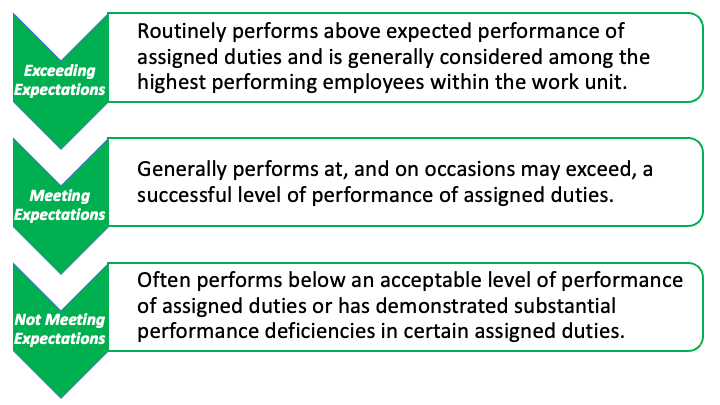
Step 3: Annual Performance Rating. Supervisors provide an overall performance rating in the XPM system. The annual overall performance rating represents the assessment of the agent’s total performance during the entire evaluation cycle. Employees must be assigned an overall performance
rating based on a defined three-point scale. NC State & NC A&T must submit these ratings to the UNC GA every year in August.
Step 4: Annual Performance Review. The CED or DED meets with Agent to discuss performance and overall rating.
Tips for Conducting Effective Performance Reviews:
- Obtain employee participation and encourage self-evaluation.
- Use specific strategies previously set with employees as standards to measure progress.
- Be clear about the consequences if performance does not improve.
- Criticize performance, not the person, when giving negative feedback.
- Use specific examples to support ratings.
- Have the employee summarize the feedback to ensure understanding.
- Keep notes throughout the evaluation period. Do not rely on recall at the end of the review period.
- Evaluate the right things. Concentrate exclusively on factors directly related to job performance.
- Don’t include rumors, allegations, or guesswork as part of your written evaluations.
- Include both positives and negatives. Do not be afraid to criticize. Do not forget to praise.
- Focus on improvement. Use the evaluation to set goals for better performance.
- A negative annual evaluation should not come as a SURPRISE.
- Do not put anything in writing that you would not say to the employee in person.
- Say what has to be said clearly and move on.
- Allow plenty of time to prepare evaluations properly. Do not work under pressure.
- Avoid completing an evaluation when you are angry, frustrated or tired.
- Focus on developing the employee and utilizing his/her strengths.
- End the evaluation on a positive note. Let the employee know you value his/her contributions and efforts.
Step 5: Electronic Signatures. Following the performance evaluation meeting, the CED or DED will electronically sign the review, which will initiate the XPM system to send an email to the agent with a notification to log into the XPM system. Agents may add comments in response to the CEDs/DEDs assessment of their performance then they electronically sign the evaluation. This signature acknowledges receipt of the document and does not necessarily imply agreement with the contents.
Questions
If you have questions about the performance management process contact your District Extension Director or County Operations.If you need technical assistance using the XPM system send a help desk request by email to eithelpdesk@ncsu.edu
Resources
- UNC-SO Regulations on Annual Performance Evaluations for EHRA Employees
- NC State Annual Evaluations of EHRA Non-Faculty (PRR 05.50.08)
- XPM Agent
- XPM NC A&T Agents
- NC A&T EHRA Evaluation Form
- XPM CED